Issue
The keyboard shortcut ⌘W to close windows in MacOS is a very useful and instinctive practice. The issue arises with tabbed windows. When the last tab in a tabbed window is closed the window itself closes. Although this is correct, it is annoying for some use cases. For example, I normally have just one window of Safari in full screen with several tabs open. I close tabs using ⌘W and open them with ⌘T. All is great until I close the last tab and the window itself closes. The annoyance is that ⌘T doesn’t open a new window in fullscreen even if the last one closed was fullscreen.
MacOS needs two new features; 1) for apps that support full screen, add a setting to let users choose to open that app in full screen when it is launched and 2) for apps that supports tabs, add a setting to let users choose if a new tab should replace the last tab when it is closed.
Tabs are a relatively new idea, and MacOS applications are inconsistent in their handling of tabs. For instance, Safari disables Close Tab in the main menu when there is only one tab but Finder and Terminal apps remove Close Tab from the main menu therefore the first solution only works for Safari. I prefer how Safari just disables Close Tab since it more closely works as ⌘W has always worked.
Solution 1 (Safari)
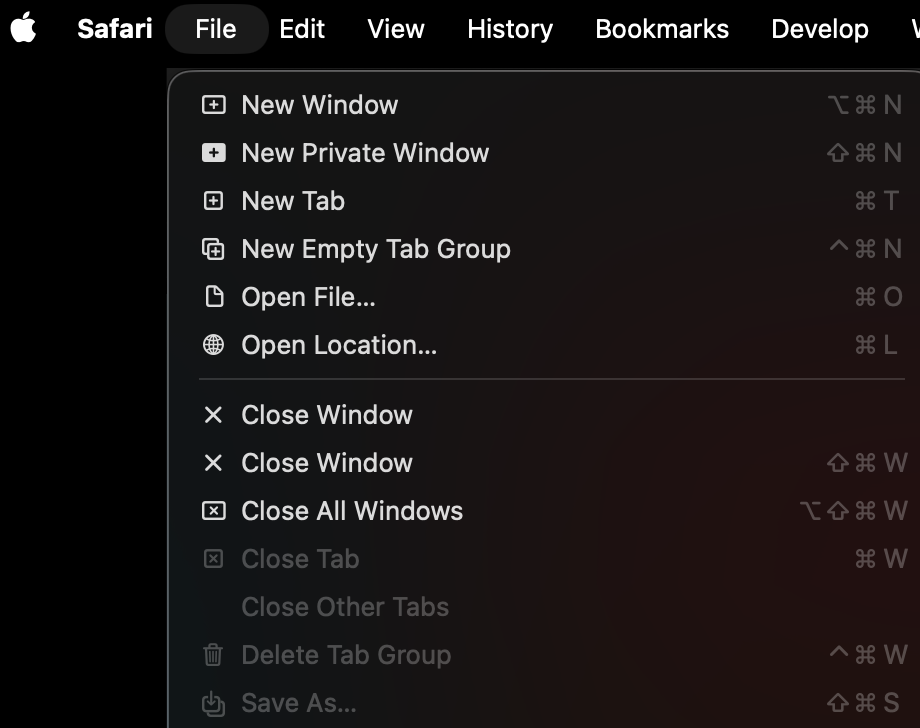
Keyboard Shortcuts in System settings can be configured to create a new tab when the last tab is closed.
1) Open System Settings
2) Search for Keyboard Shortcuts
3) Click App Shortcuts
4) Click + to add a new shortcut.

5) Add a new shortcut for Safari as shown in the image.

This re-assigns ⌘W to Close Tab and assigns ⇧⌘W to Close Window.
Solution 2
This solution prevents closing the last tab on more apps but changes how ⌘W has historically worked because it redefines the Close Window shortcut to ⇧⌘W.
1) Open System Settings
2) Search for Keyboard Shortcuts
3) Click App Shortcuts
4) Click + to add a new shortcut.

5) Add two new shortcuts for All Applications as shown in the image below; one which assigns ⌘W to Close Tab and another that assigns ⇧⌘W to Close Window. This has the side effect needing to use ⇧⌘W to close a window in non-tabbed applications.

This re-assigns ⌘W to Close Tab and assigns ⇧⌘W to Close Window.
Conclusion
Hopefully, the features will be added to future releases of MacOS, but until then this workaround can prevent the annoyance of having to open a new window and make it fullscreen each time you accidentally close the last tab.